Agent skills
The N|Solid IDE extension installs agent skills from the NodeSource AI toolkit into your workspace. Skills give the AI agent step-by-step guidance for common N|Solid tasks, such as investigating runtime events, analyzing assets, benchmarking functions, and reviewing dependencies. This page explains what skills are, how they're installed, and which chat commands use them.
Working in a terminal agent such as Claude Code or Codex CLI instead of VS Code? The N|Solid plugin for AI coding agents installs N|Solid skills and MCP servers for those tools.
What skills are
A skill is a packaged set of instructions and workflow context for one specific job. Instead of improvising each time, the agent loads the relevant skill and follows it.
Skills help most with tasks that need a repeatable structure, such as:
- Analyzing a CPU issue
- Investigating a runtime event
- Reviewing a downloaded diagnostic asset
- Auditing dependencies
- Validating an optimization with benchmarks
Install the skills
Skills are installed when you click Install Toolkit (or Reinstall Toolkit / Update Skills) in the Welcome view. See Install the AI toolkit. During installation, the extension:
- Creates or updates the workspace MCP configuration (
.vscode/mcp.jsonin VS Code). - Clones the skills repository set in
nsolid.skillsRepository(defaulthttps://github.com/nodesource/nsolid-ai-skills.git) withgitover HTTPS, and copies every folder whose name starts withns-into.agents/skills. Existingns-skill folders are replaced, so reinstalling updates them.
Skills installation requires git on your PATH and network access to the repository.
Where skills live
After installation, the skills are in the workspace under:
.agents/skills/
Because the skills are local to the workspace, the extension can load them when you start a supported workflow. Other AI agents that read skills from .agents/skills can use them too.
Chat commands that use skills
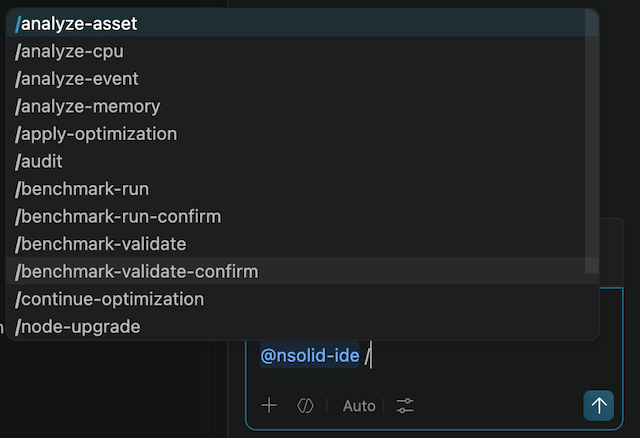
Type @nsolid in the chat panel followed by a command. These commands load a skill from .agents/skills when it's installed:
| Command | Skill folder | What it does |
|---|---|---|
/analyze-asset | ns-analyze-asset | Analyzes an existing N|Solid asset or local profile file. |
/analyze-event | ns-analyze-event | Investigates an N|Solid event with runtime context. |
/analyze-cpu | ns-analyze-cpu | Investigates CPU-related performance problems. |
/analyze-memory | ns-analyze-memory | Investigates memory growth and heap usage. |
/benchmark-run | ns-benchmark-run | Benchmarks a single function and saves the result. |
/benchmark-validate | ns-benchmark-validate | Compares original and optimized implementations with A/B benchmarks. |
/audit | ns-audit-dependencies | Audits workspace dependencies and suggests remediation. |
/upgrade <package> | ns-upgrade-package | Evaluates and guides a package upgrade. |
/replace <package> | ns-replace-package | Finds a safer or better-maintained replacement package. |
/node-upgrade | ns-node-upgrade | Plans a Node.js version upgrade. |
/generate-asset | — | Captures a new CPU profile, heap snapshot, or heap sample. |
The dependency and Node.js upgrade commands also use the NCM MCP server directly. See NodeSource Certified Modules.
Where these workflows start
You can type these commands yourself, but most workflows start from an extension view that passes context into chat:
- Asset analysis — Ask AI in the Asset Directory.
- Event investigation — Analyze with AI in the Events view.
- CPU and memory analysis — Ask AI on an alert in the Telemetry view.
- Benchmarking — the Generate Benchmark code lens above a function.
- Dependency review — the actions in the NCM Actions view.
