Telemetry
The Telemetry view in the N|Solid IDE extension shows live data for the applications reporting to your N|Solid Console, and raises alerts when an application's CPU, memory, or event loop metrics spike. To open it, click the N|Solid icon in the Activity Bar and expand Telemetry.
What the view shows
The view lists connected applications in a table with these columns:
| Column | Meaning |
|---|---|
| Application Name | The application name reported by the N|Solid Runtime. |
| Procs | Number of connected processes. |
| CPU % | CPU usage. |
| Memory (MB) | Memory usage. |
| Vulns | Number of known vulnerabilities. |
| EL % | Event loop utilization. |
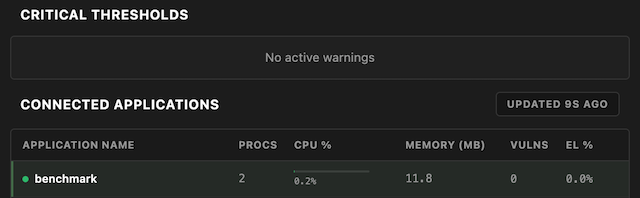
If your workspace is mapped to an application, that application is listed first. To reload the data, click the refresh icon in the view's title bar or run Refresh Telemetry from the Command Palette.
Alerts and follow-up actions
The extension watches the telemetry for anomalies and shows an alert card when it detects one, for example:
- CPU usage above 80% for 10 consecutive readings, or a sudden jump in CPU usage.
- Heap usage spikes or steady heap growth that may indicate a memory leak.
- Event loop utilization above 70% for 10 consecutive readings, or a sudden jump.
Alert cards include an Ask AI button (for example, Ask AI: Profile CPU) that opens an @nsolid chat session. The prompt asks the AI agent to capture and analyze a diagnostic asset, such as a 30-second CPU profile, for the affected application.
When no applications appear
If no applications are reporting metrics to the Console, the view shows an empty state instead of the table. This usually means one of the following:
- Your N|Solid credentials or connection aren't configured correctly. See Confirm your connection.
- Your Node.js applications aren't reporting telemetry to the configured Console. See Connect your application.
